1. News
  2. Community
    1. Dashboard
    2. Mitglieder
      1. Mitgliedersuche
      2. EM-Hub Team
    3. FAQ
  3. Filebase
  4. Lexikon
  5. Img-Upload
  • Anmelden
  • Registrieren
  • Suche
Dieses Thema
  • Alles
  • Dieses Thema
  • Dieses Forum
  • Artikel
  • Seiten
  • Forum
  • Dateien
  • Lexikon
  • FAQ
  • Galerie
  • Modding Team
  • Modding Teamseiten
  • Erweiterte Suche
  1. Emergency Hub
  2. EMERGENCY Reihe
  3. EMERGENCY 4
  4. Modding

Antiphon's Toolbox

  • Antiphon
  • 30. Mai 2025 um 15:22

Jetzt Mitglied werden!

Du bist noch kein Emergency Hub Member? Registriere dich kostenlos und werde Teil der Emergency Hub Community :)

Benutzerkonto erstellen Anmelden
  • Antiphon
    Emergency Hub Team
    Reaktionen
    897
    Beiträge
    204
    Dateien
    16
    Modding Teams
    • 30. Mai 2025 um 15:22
    • #1

    Antiphon's Toolbox


    In den letzten Tagen habe ich meine Festplatte ein bischen aufgeräumt, und die Python-Scripte, die ich für das Modding in Em4 erstellt habe, etwas sortiert. Ich habe nun einige dieser Scripte in .exe Dateien gepackt und stelle diese hier zur Verfügung. Wenn ich mehr Zeit finde, werde ich auch die restlichen Programme noch hochladen.

    Die Nutzung geschieht auf eigene Gefahr. Es wird dringend geraten vor der Nutzung jeglicher Programme entsprechende Backups anzulegen.


    Dieser Thread gibt nun eine Übersicht über die verschiedenen Python-Basierten Programme die ich erstellt habe, um die Entwicklung von Modifikationen in Em4 zu erleichtern.

    Plugins für Blender zum Exportieren von v3o Dateien:

    Blender 4.2:

    Datei

    Blender 4.2 | v3o-Plugin

    Plugin zum Import und Export von v3o-Modellen in Blender 4.
    Antiphon
    20. August 2024 um 14:23

    Blender 3.0:

    Datei

    Blender 3.0 | v3o-Plugin

    Plugin zum Import und Export von v3o-Modellen in Blender 3.
    Antiphon
    12. November 2023 um 16:13

    Plugin für Blender zum Erstellen von Lights für Fahrzeuge in Emergency 4:

    Datei

    Blender 3.0+, 4.0+ | e4p-Plugin

    Plugin zum erstellen von Lights für Em4 mittels Blender.
    Antiphon
    20. August 2024 um 14:51

    Python basiertes Programm zum Reskalieren von Objekten für Emergency 4 (v3o, e4p, vmo):

    Datei

    em4Rescaler (v3o, e4p, vmo)

    Ein Python basiertes Program um Objekte in Em4-Formaten zu skalieren. A python based program to rescale objects in Em4 file formats.
    Antiphon
    30. Mai 2025 um 14:41

    Python basiertes Programm um Command-Icons zu generieren:

    Datei

    commandIconGenerator

    Ein Python basierter Command-Icon Generator. A python based command icon generator.
    Antiphon
    30. Mai 2025 um 15:07

    Python basiertes Programm um .e4p Dateien in einem Text-Editor zu bearbeiten:

    Datei

    e4pViewer

    Ein Python basiertes Tool um e4p Dateien im Texteditor zu öffnen. A python based tool to open e4p-files in text editor.
    Antiphon
    30. Mai 2025 um 14:47

    Python basiertes Programm um .e4p Dateien in ein lesbares .e4p.xml Format umzuwandeln:

    Datei

    e4p2xmlConverter

    Ein Python basiertes Tool um Dateien zwischen dem .e4p und .e4p.xml Format zu konvertieren. A phyton based tool to convert files between the .e4p and human readable .e4p.xml format.
    Antiphon
    30. Mai 2025 um 14:54

    Dieses Umwandlung ist im e4pViewer automatisiert.

    Python basiertes Programm um Scripte zu packen und damit die Script-Ladezeiten auf <1s zu reduzieren:

    Datei

    preCompile for Emergency4

    Emergency 4 Script Precompiler.
    Antiphon
    7. Juli 2026 um 13:10

    More to follow..


    Probleme bei der Nutzung des Tools oder Wünsche nach weiteren Tools können in diesem Thread geäußert werden.

    Es besteht kein Anspruch auf Support.

    Einmal editiert, zuletzt von Antiphon (7. Juli 2026 um 13:11)

  • C.F.D
    Neuling
    Beiträge
    3
    • 6. Juli 2025 um 00:19
    • #2

    Were you ever able to fully decipher how the Emergency 4 light editor handles its logic — specifically in terms of flash frequency, offsets, intensity, and how it processes timing? I'm curious whether the system has been reverse engineered enough to allow for deeper control over light behavior, such as creating more complex flash patterns or timing sequences.

    Also, is it technically possible to develop a more advanced external light editor or tool — one that would streamline mod development by enabling features like copying and pasting entire layered light setups, batch editing multiple lights at once, or visually previewing the timing of all light patterns? This would drastically improve workflow compared to editing individual lights one by one.

  • Antiphon
    Emergency Hub Team
    Reaktionen
    897
    Beiträge
    204
    Dateien
    16
    Modding Teams
    • 7. Juli 2025 um 01:53
    • #3
    Zitat von C.F.D

    specifically in terms of flash frequency, offsets, intensity, and how it processes timing? I'm curious whether the system has been reverse engineered enough to allow for deeper control over light behavior, such as creating more complex flash patterns or timing sequences.

    Yeah pretty much, you can edit the values if you open it with the e4pViewer

    Zitat von C.F.D

    one that would streamline mod development by enabling features like copying and pasting entire layered light setups, batch editing multiple lights at once,

    You can do this with the blender plugin already, only the frequencies are propably best set in the editor. Of course one could do more here, however I believe the required effort would not realy be worth the gains.

  • C.F.D
    Neuling
    Beiträge
    3
    • 13. Juli 2025 um 02:47
    • #4
    Zitat von Antiphon

    Yeah pretty much, you can edit the values if you open it with the e4pViewer

    You can do this with the blender plugin already, only the frequencies are propably best set in the editor. Of course one could do more here, however I believe the required effort would not realy be worth the gains.

    Gotcha, I’ll take a look at the EP4 viewer, but I’ve never used Blender before so I’m not sure it’ll be worth the hassle. Still, I’ll poke around and see if anything stands out.

  • C.F.D
    Neuling
    Beiträge
    3
    • 3. September 2025 um 22:28
    • #5

    Antiphon

    Hello, i went and downloaded your plugins for Blender 4.0 +. I am enjoying how easy it is to edit lights. However, I have a suggestion and question.

    1.) Under your EM4 Light configuration box, it is missing a toggleable "Polygon Glow" option which is available in editor but not in your plugin, there is only "Polygon Darken" and "Bright Light" It would be great if you can include this.

    2.) When making radiations in blender, how can i see the visual of it so i know how it'll look before rendering it in the editor.


    Thank you!

  • Antiphon
    Emergency Hub Team
    Reaktionen
    897
    Beiträge
    204
    Dateien
    16
    Modding Teams
    • 7. September 2025 um 12:55
    • #6
    Zitat von C.F.D

    it is missing a toggleable "Polygon Glow" option

    just curious, have you (or anyone else) ever used the polygon glow option?

    Zitat von C.F.D

    When making radiations in blender, how can i see the visual of it so i know how it'll look before rendering it in the editor.

    You can make a plane in Blender with shift+A->mesh->plane. Move the plane in the position where you want to have the radiation and select the plane in the 'Get From Plane' option. Then press Load. Under 'Show Positions' you will then see the radiation positions.

  • Antiphon
    Emergency Hub Team
    Reaktionen
    897
    Beiträge
    204
    Dateien
    16
    Modding Teams
    • 7. Juli 2026 um 13:12
    • #7

    Ein neues Tool um die Ladezeiten von Mods zu reduzieren. Sourcecode liegt bei.

    Datei

    preCompile for Emergency4

    Emergency 4 Script Precompiler.
    Antiphon
    7. Juli 2026 um 13:10
  • Online
    itchyboy
    Erfahrenes Mitglied
    Reaktionen
    213
    Beiträge
    46
    • 15. November 2026 um 17:00
    • #8

    I'm not sure if this is the right thread to ask but have you found a way to make custom animations for person models work? I was thinking of using Blender's keyframe animations system to move bones around on the model, to make the model act accordingly but I am not quite sure how I'm supposed to export this or even have it in Blender itself.

    Also I'd like to apologize and say I was a dumbass regarding the preCompile. I found out the reason it didn't work for me was due to the Include Library file in the config.json

    I was actually supposed to remove that entire section for it to compile automatically in any mod. I do recommend this for anyone reading btw, it's free performance gains.

    For anyone who may have trouble figuring this thing out or getting it to work:

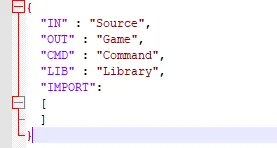
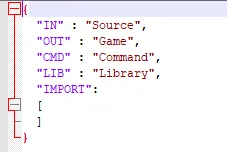
    Follow Antiphon's instructions but edit the settings.json so that it looks like this. This is to avoid the error where the compiler looks for a nonexistent library.h

    Now that I know what the Include library function is for, I'd like to ask:

    What happens if I want to include a large libary file with lots of lines? Will that cause loading times to worsen or a performance hit to the game? After all, my understanding of it is that it copies the entire libary into every script 1:1, even scripts that may not need it. Is there a way to limit the inclusion of my library to only specified scripts?

    Zitat von Antiphon

    just curious, have you (or anyone else) ever used the polygon glow option?

    By the way I'd also like to say that yes, I use the polygon glow feature a LOT.

    Einmal editiert, zuletzt von itchyboy (15. November 2026 um 17:06)

  • Antiphon
    Emergency Hub Team
    Reaktionen
    897
    Beiträge
    204
    Dateien
    16
    Modding Teams
    • 15. November 2026 um 17:48
    • #9
    Zitat von itchyboy

    I'm not sure if this is the right thread to ask but have you found a way to make custom animations for person models work? I was thinking of using Blender's keyframe animations system to move bones around on the model, to make the model act accordingly but I am not quite sure how I'm supposed to export this or even have it in Blender itself.

    In principle that is the way to go, but the current blender-plugins don't support exporting vmos, so it won't have any effect. I have seen some person animations around, so likely someone has made the few required changes to support exporting, as it is probably not to hard with AI.

    I plan to do a new version of the plugins for the blender 5.2 LTS, I might include features such as this and polygon glow. If anyone has any other suggestions, let me know.

    Zitat von itchyboy

    I was actually supposed to remove that entire section for it to compile automatically in any mod. I do recommend this for anyone reading btw, it's free performance gains.

    Yeah, the download includes the Auenburg version, you will have to change the config.json. It should also work if you have just no config.json.

    Zitat von itchyboy

    What happens if I want to include a large libary file with lots of lines? Will that cause loading times to worsen or a performance hit to the game? After all, my understanding of it is that it copies the entire libary into every script 1:1, even scripts that may not need it. Is there a way to limit the inclusion of my library to only specified scripts?

    I would not expect a drastic performance impact, but you can just make multiple smaller library files and import them in the scripts you need with #import [filename] as [alias] at the top of the script.

  • Online
    itchyboy
    Erfahrenes Mitglied
    Reaktionen
    213
    Beiträge
    46
    • 15. November 2026 um 17:57
    • #10
    Zitat von Antiphon

    Dude it would be freaking awesome if you pulled it off, even if it's for a newer version of Blender. My only request if there's a way for you to make it still work in Blender 4.x, so that I don't have to download yet another version of Blender and keep up multiple file versions. Basically, I work primarily in a mix of older versions and for my specific case I end up losing track of which blend file is for 2.7, 4, or 5.

    But you don't have to, I can do a thing where my person models blend files are on 5.2 and my older ones on 4.6 and 2.7.

    Zitat von Antiphon

    I would not expect a drastic performance impact, but you can just make multiple smaller library files and import them in the scripts you need with #import [filename] as [alias] at the top of the script.

    Okay this makes more sense. It's just that one line right and nothing else? I think this method is better to avoid duplication.

    To clarify if I add that import line to the relevant script, do I still need to define the same .h file in the settings.json? Or is that line enough?

  • Antiphon
    Emergency Hub Team
    Reaktionen
    897
    Beiträge
    204
    Dateien
    16
    Modding Teams
    • 15. November 2026 um 18:13
    • #11
    Zitat von itchyboy

    To clarify if I add that import line to the relevant script, do I still need to define the same .h file in the settings.json? Or is that line enough?

    You just need to add the line to the script. What the import list in the settings file does is it basically just puts such a line on the top of every script before compiling, so also adding it there would add it twice.

    I am not quite sure what you mean by the .h file, we aren't using header files as this system is a custom system independent of the C inclusion system. That's why it is #import and not #include as normal in C/C++. The suffix for our library files is .lib.

  • Online
    itchyboy
    Erfahrenes Mitglied
    Reaktionen
    213
    Beiträge
    46
    • 15. November 2026 um 18:20
    • #12
    Zitat von Antiphon

    You just need to add the line to the script. What the import list in the settings file does is it basically just puts such a line on the top of every script before compiling, so also adding it there would add it twice.

    I am not quite sure what you mean by the .h file, we aren't using header files as this system is a custom system independent of the C inclusion system. That's why it is #import and not #include as normal in C/C++. The suffix for our library files is .lib.

    My bad, I'm used to .h because this is what I remembe from many years ago from college when were taught to import files in C. Your method is very different and it's tripping me up lmao.

    All good though, I did trial and error and found out how it works. I figured it out.

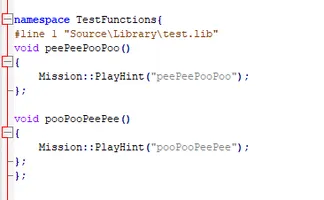
    I can report that I was able to get the namespace of my test libary added into this specific .script. I left my settings.json blank and it did not add this anywhere else.

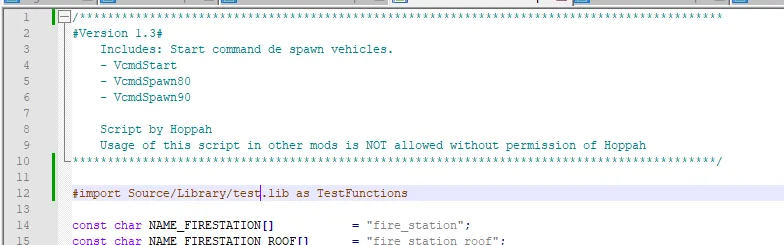
    For anyone else attempting this, here's the format on my end.

    I put it up here above all my const chars. It slots right into any script, including LA mod based stuff. By the way, no quotes needed for the libary path. Another thing I have to keep in mind because I initially added quotations to the filepath and it threw a "not found" error.

    Seriously man thank you for the technical support. What you've just explained changes a LOT with Em4 scripting and solves the main bullshit about not being able to load a class or function located in one .script, but then needing it in another script.

    This stuff is in fact, so powerful, I may have to go through and rewrite my entire scripts systems to work this way. I can think of at least 5 common functions I'd like to split off into their own libary.

    Update: I can trigger functions. Very good, now I need to confirm if I can store values, and have the value be edited.

    I will need to now check if there is a library called by 2 scripts, what happens if there's a variable inside and one script edits it, who's changes will reflect. Is it first come first serve, time to find out...

    Einmal editiert, zuletzt von itchyboy (15. November 2026 um 18:40)

Letzte Beiträge

  • Antiphon's Toolbox

    itchyboy 15. November 2026 um 18:20
  • 4K UI Upscale Patch

    Lith7ium 15. November 2026 um 18:00
  • Wie viel KI nutzt ihr beim modden?

    itchyboy 15. November 2026 um 16:40
  • Emergency 3 Bremerhaven Mod

    RIOLPTV 13. November 2026 um 22:26
  • Zeigt her Eure 3D-Basteleien

    itchyboy 10. November 2026 um 09:33

Forum online seit:

3 Jahren, 4 Tagen, 4 Stunden und 21 Minuten

Benutzer online in diesem Thema

  • 5 Mitglieder und 1 Besucher
  • captainnom2899
  • Flo_Deutschland
  • itchyboy
  • Niclas724
  • Nico Schöberl
Legende
  • Administration
  • Emergency Hub Team
  • Ehrenmember
  • Registrierte Benutzer

Informationen

  1. FAQ
  2. Datenschutzerklärung
  3. Impressum

Community

  1. Letzte Aktivitäten
  2. Mitgliedersuche
  3. Mitglieder
  4. Team

Über uns

Ein Communityprojekt von vielen bekannten Gesichtern aus der EMERGENCY-Szene, bestehend aus ehem. Mitgliedern des Forums, Moddern und Streamern.

Von der Community, für die Community!

Emergency Hub
Community-Software: WoltLab Suite™
Style by Foxly